|
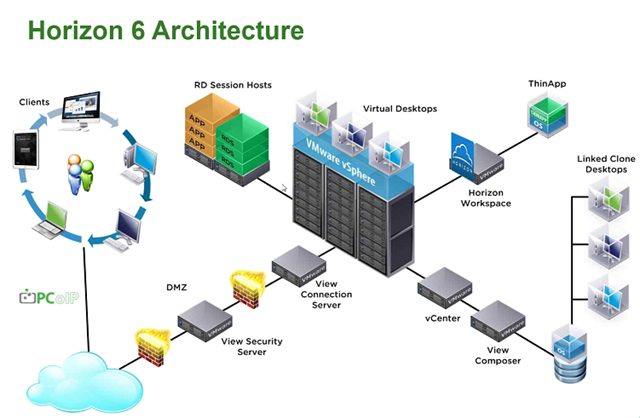
Announced back in September of 2014, VMware Horizon View 6 has over 100 new features like integration with Citrix XenApp and SAN Acceleration to name a few. I will focus on five major enhancements in this blog. You can download the FAQ's from VMware Here.
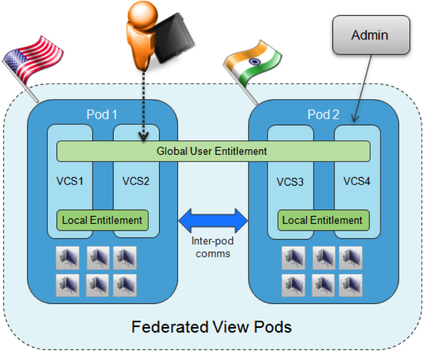
 Cloud POD Architecture VMware Horizon Cloud POD Architecture in Horizon 6 allows for virtual desktops to be deployed across multiple sites and managed globally through a single entitlement layer. This brings central management to multiple PODs. Some of the enhancements with Cloud POD Architecture:
 RDS Hosted Applications One of the many new capabilities that is available is application remoting of RDS hosted apps and extended capabilities for RDS based desktops. VMware worked with Microsoft to develop their own protocol which enables them to integrate VMware graphics and protocol stacks such as Blast with PCoIP with RDS. These new features work with Windows and Non-Windows devices such as Windows XP, Windows 7 and Windows 8 desktops, laptops and thin clients, iOS and Android tablets and Mac OSX. Virtual SAN for Horizon View Desktops VMware Virtual SAN, a new software-defined storage tier, pools compute and direct-attached storage resources and clusters server disks and flash to create resilient shared storage. VSAN support was added to Horizon View in version 5.3 available as a separate product. Now in Enterprise and Advanced licensing of Horizon View 6, VSAN is included. Application Catalog The Application Catalog offers a unified workspace for applications. One portal to for all applications. This allows you to present VDI Desktops, RDSH Desktops/Apps as well as all your SaaS apps, Citrix XenApp published applications, locally ThinApps, Office 365 and other apps all within a single workspace. This can be tailored to a client device so you get a tablet experience on a tablet. 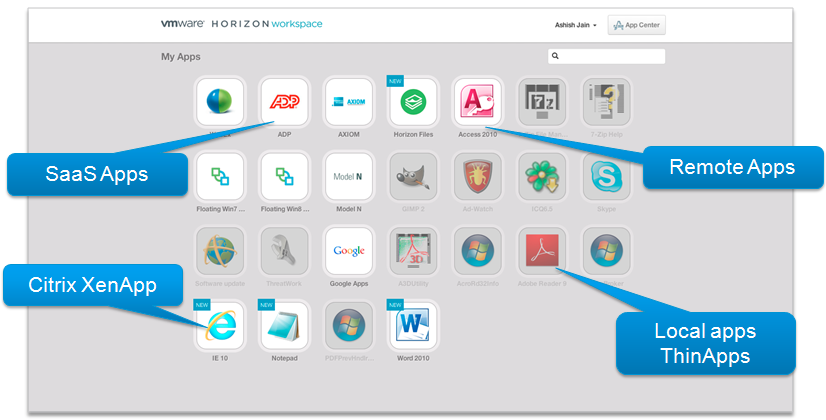 VMware announced Citrix XenApp integration into Horizon Workspace at VMworld 2012 and is finally delivering. You can logon to Horizon Workspace once which will in turn connect to your Citrix XenApp infrastructure and display published desktops and applications you are entitled to. The application catalog also has multi-forest Active Directory support and can be easily customized by changing logos, login prompt, application launchers, backgrounds etc. vCOPS for Horizon View vCenter Operations Manager now comes with a single integrated console for both servers and desktops, etc. You can drill down into the process level for key performance metrics and resource consumption. Horizon 6 has three new editions available:
Summary from VMware on Horizon View 6
0 Comments
Your comment will be posted after it is approved.
Leave a Reply. |
Recognition
Categories
All
Archives
June 2024
|
 RSS Feed