|
With the advent of vSphere 6.0 Update 1 I knew it would be a matter of time until I was engaged to upgrade an environment. My customer had a small size vSphere 5.0 production environment that they wanted upgraded to 6.0. I met with them and helped to educate them on new features of 6.0 and designed an upgrade plan. The customer, due to the new features of the vCenter, wanted to migrate to the vCenter Appliance and if you are not aware, the vCenter Appliance now supports the same infrastructure as the Windows based vCenter. 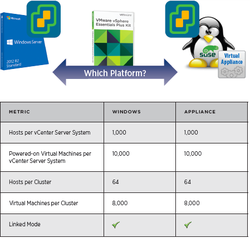 Some initial challenges I came across with migrating their infrastructure came around the design decisions that were made prior to the migration. Their vCenter server had the vCenter Database installed with the Windows based vCenter server which meant that I would not be able to migrate using the VCS to VCVA Converter. If you are not familiar with the product take a look at it here. The product makes migrating a Windows based vCenter with an external database very simple. You deploy a new vCenter Appliance with the same name and IP as the current vCenter. Then you deploy the Migration Appliance. The Appliance will gather setting from the Windows vCenter. This is is then shut down and you point the appliance to the external vCenter Database. The security profiles, etc. are migrating into the new vCenter Appliance. What I LearnedThis was not my first upgrade and considering that the customer wanted to migrate to the vCenter Appliance I needed to make sure that all settings were brought over correctly. Lesson 1 - Interoperability & PlanningOne of the main areas I have seen get missed during the planning stage is performing the interoperability matrix's with vendors and VMware in order to make sure that the hardware you are upgrading is supported. Vendors have created some great online tools to perform this task although it can be time consuming it will save you troubleshooting the environment after upgrade. Lesson 2 - VMware Supported Sign Off Once you have your plan in place open a case with VMware to review the steps with you. They will take the time to review the environment and your upgrade plan to insure that you did not miss any steps. Lesson 3 - Virtual Distributed SwitchesMigrating the vDS from 5.0 to 6.0 will present challenges when migrating from a Windows based vCenter to an appliance. This can be accomplished in stages if you first upgrade to 5.5 and then export the vDS configuration and import it into the new appliance. (See KB2034602) This process obviously adds to the complexities of an upgrade of this type and depending on the size of the environment it may be the direction to go if you really feel the need to migrate to the appliance. With this particular environment being so small and no vDS in use due to license limitations I luckily didn’t have to deal with that scenario. Lesson 4 - Easy UpgradeOnce the new appliance had been deployed the migration of the hosts and vms was pretty straight forward. Disconnect the hosts from the 5.0 Windows vCenter, add the hosts to the newly created vCenter 6.0 Appliance and place them in the new cluster.
At this point it’s just a matter of upgrading hosts and vms. I created a new upgrade baseline using the ESXi 6.0 Update 1 iso and attached that to the host that required the upgrade. This is only one of many upgrade paths to 6.0. Don’t forget that you will need to have deployed the Update Manager. This is not supported on the same vm as the appliance so this will need to be installed on a separate vm. Note: The VCSA iso does not have the installer so you will need to download the the vCenter iso alongside the VCSA iso.
0 Comments
|
Recognition
Categories
All
Archives
June 2024
|
 RSS Feed