mobility management (EMM) from VMware AirWatch, the recently introduced VMware Identity Manager and the new cloud management service in VMware Horizon Air. Workspace One includes self-service access, choice of device, conditional access, automation and productivity tools along with several major updates to the VMware End-User Computing portfolio. Updates to the VMware End-User Computing product portfolio include:
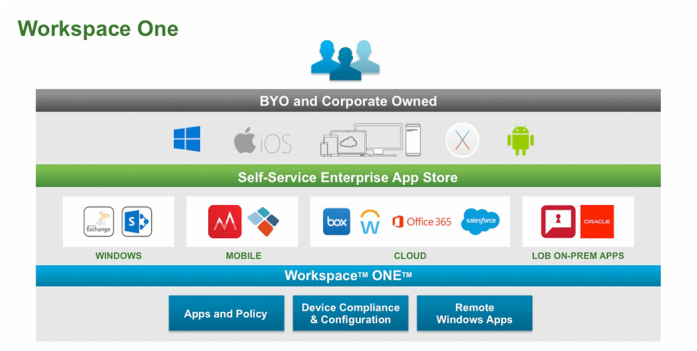
So What does Workspace One do for you?Self-Service Access to Cloud, Mobile & Windows AppsOnce authenticated through the VMware Workspace ONE app, employees can instantly access their personalized enterprise app catalog where they can subscribe to virtually any mobile, cloud or Windows application. With the built-in VMware Identity Manager, access to applications is only a touch away as single sign-on authentication is already established through the device. 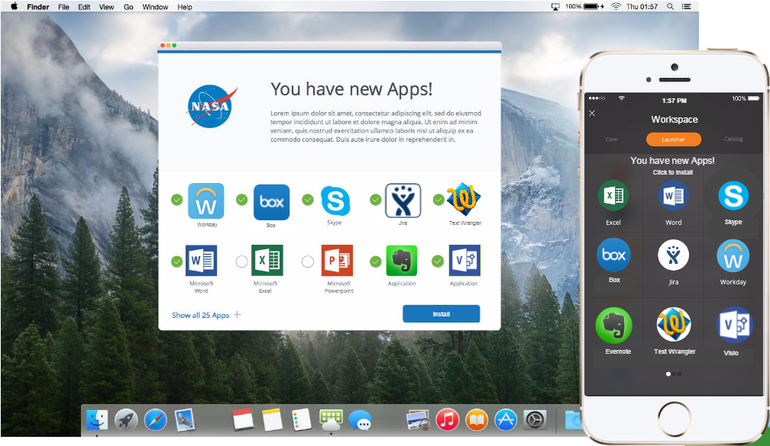 ChoiceVMware Workspace ONE with adaptive enrollment puts the device choice in employees’ hands for the level of convenience, access, security and management that makes sense for their workstyle providing friction-free adoption of BYOD programs while getting IT out of the device business. Secure ProductivityWorkspace One will include consumer-style email, calendar, contacts, documents, chat, and enterprise social that employees want to use while invisible security measures protect the organization from data leakage by restricting how attachments and files can be edited and shared. Employees, devices, apps and data increasingly live beyond the physical walls of the workplace, the data center, or the network. VMware Workspace ONE combines identity and device management to enforce access decisions based on a range of conditions from strength of authentication, network, location and device compliance. For sensitive information, Workspace One will combine identity and device management with ComplianceCheck Conditional Access to enforce access decisions across any application or device. The AirWatch policy engine automates device compliance through customizable warnings and full or selective device wipe and secures information by protecting the data stored in applications and limiting data leakage through cut, copy, paste or export controls. Single-Sign On access, for example, leverages Secure App Token Systems for authentication. Once authenticated, employees gain instant self-service access to a personalized enterprise application store where they can subscribe to virtually any mobile, cloud or Windows application. Application Delivery & AutomationWorkspace One will combine VMware AirWatch mobile management and VMware Horizon along with VMware App Volumes application-delivery technology. It will also take full advantage of the new capabilities of Windows and leverages VMware AirWatch mobile management system to allow desktop administrators to automate application distribution and updates on the fly. Combined with Horizon virtualization technology, automating the application delivery process enables better security and compliance. PricingThe new platform is expected to be generally available this quarter in standard, advanced and enterprise editions. Prices will start at $8 per user per month for cloud subscriptions and $150 per user for on-premises perpetual licenses. In the video below, Sumit Dhawan, Senior Vice President and General Manager of desktop products in the End-User Computing group at VMware, introduces Workspace One.
0 Comments
VMware this year has decided to make changes to their licensing in order to better address the needs of their customers. These new packages are tailored to the top use cases from VMware customers in both SDDC and Hybrid Cloud. You should see increased value with more features in the product editions like log insight being included with vSphere now and added portability of your licenses. New product line up for VMware vSphere and vSphere with Operations Management (vSOM) editions:
vCloud Suite (vCS) = vRealize Suite (vRS) + vSphere Enterprise Plus for vCloud Suite:
New vSphere and vSphere with Operations Management See the VMware pricing page for further information. 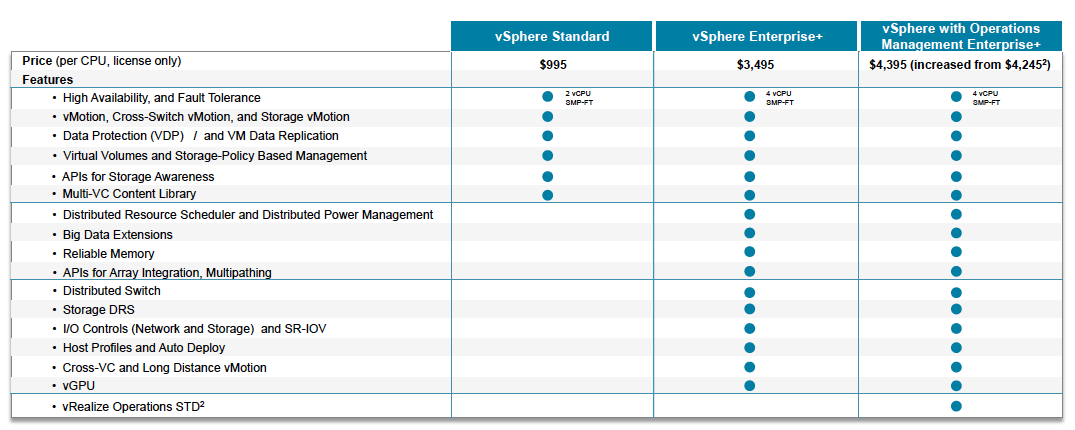 vRealize Suite (vRS) and vCloud Suite (vCS) Update for Changes in 2016: VMware has vastly simplified the packaging of their cloud management and compute virtualization product portfolio. See the VMware Blog for indepth information. 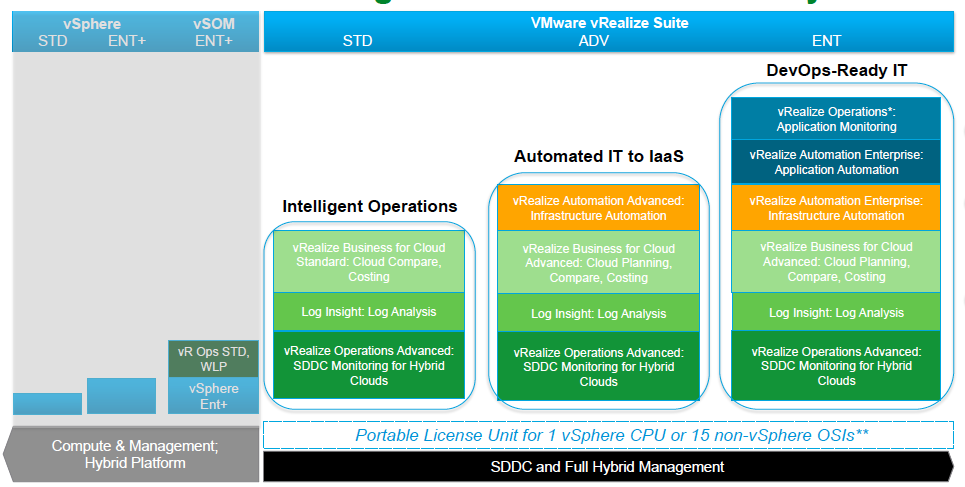  It's that time again and I highly suggest joining in. Not only will you be a part of a great community learning new products but you'll get the chance to offer your input into the direction.
The target audience are customers who have deployed vSphere 5.5 and 6.0 in a portion of their environment. Participants are expected to:
vSphere Beta Program Overview We are excited to announce the upcoming VMware vSphere Beta Program. This program enables participants to help define the direction of the most widely adopted industry-leading virtualization platform. Folks who want to participate in the program can now indicate their interest by filling out this simple form. The vSphere team will grant access to the program to selected candidates in stages. This vSphere Beta Program leverages a private Beta community to download software and share information. We will provide discussion forums, webinars, and service requests to enable you to share your feedback with us. You can expect to download, install, and test vSphere Beta software in your environment or get invited to try new features in a VMware hosted environment. All testing is free-form and we encourage you to use our software in ways that interest you. This will provide us with valuable insight into how you use vSphere in real-world conditions and with real-world test cases, enabling us to better align our product with your business needs. shadow-table Some of the many reasons to participate in this beta opportunity:
|
Recognition
Categories
All
Archives
June 2024
|
 RSS Feed