virtualizationvelocity
  • Home
  • About
  • VMware Explore
    • VMware Explore 2025
    • VMware Explore 2024
    • VMware Explore 2023
    • VMware Explore 2022
  • VMworld
    • VMworld 2021
    • VMworld 2020
    • VMworld 2019
    • VMworld 2018
    • VMworld 2017
    • VMworld 2016
    • VMWorld 2015
    • VMWorld 2014
  • vExpert
  • The Class Room
  • VMUG Advantage
  • AI-Q Game
  • Video Hub
  • Tech-Humor
  • Contact
  • TCO Calculator

Your Definitive Source for Actionable Insights on Cloud, Virtualization & Modern Enterprise IT

App Volumes Have Been Added to Horizon Enterprise Bundle

1/26/2015

0 Comments

 
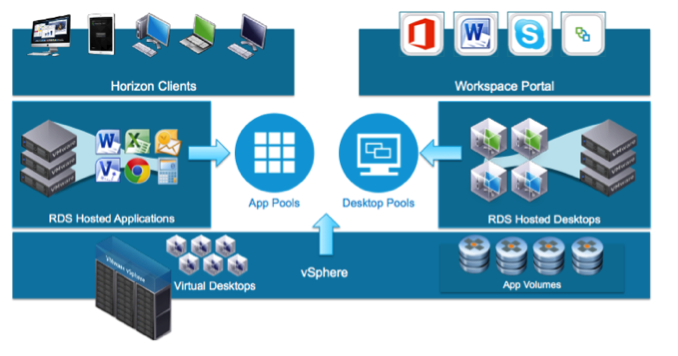
VMware announced on January 25th that App Volumes, formerly Cloud Volumes, has been added to the Horizon View Enterprise Licencing bundle.
Picture
VMware App Volumes provides real-time application delivery to end-users and desktops. IT can use App Volumes to instantly deliver applications and data to users without compromising user experience. Infrastructure and management costs are reduced by utilizing managed volumes. Unlike traditional application management solutions, App Volumes allows IT to deliver a desktop with no trade-off between user experience and costs. 

For a quick overview of VMware App Volumes see this video from VMware.
Benefits of using App Volumes: 
  • IT can deliver or upgrade application workloads within seconds. Provisioning applications is as easy as simply installing them once. 
  • App Volumes also helps to deliver great user experience while driving down storage and management costs. With App Volumes, end users can take advantage of fully customized desktops and enjoy the ability to install their own applications and have them persist across sessions. 
  • IT can drive down compute, network, and storage costs by leveraging on-demand layering and the non-persistent architecture that App Volumes helps to enable. App Volumes virtual disks can be placed on any supported VMware vSphere datastore, enabling IT to leverage the most appropriate storage including fast storage with high read IOPS such as VMware Virtual SAN instead of needing to stream application across the network from a CIFS shares
  • VMware App Volumes can be leveraged by physical desktops.
  • For Non-VMware VDI environments you can utilize App Volumes on Citrix XenDesktop, XenApp and RDSH.
0 Comments

Your comment will be posted after it is approved.


Leave a Reply.

      Join Our Community

    Subscribe

    Categories

    All
    Artificial Intelligence
    Automation & Operations
    Certification & Careers
    Cloud & Hybrid IT
    Enterprise Technology & Strategy
    General
    Hardware & End-User Computing
    Virtualization & Core Infrastructure

    Recognition

    Picture
    Picture
    Picture
    Picture
    Picture
    Picture
    Picture
    Picture
    Picture
    Picture

    RSS Feed

    Follow @bdseymour

Virtualization Velocity

© 2025 Brandon Seymour. All rights reserved.

Privacy Policy | Contact

Follow:

LinkedIn X Facebook Email
  • Home
  • About
  • VMware Explore
    • VMware Explore 2025
    • VMware Explore 2024
    • VMware Explore 2023
    • VMware Explore 2022
  • VMworld
    • VMworld 2021
    • VMworld 2020
    • VMworld 2019
    • VMworld 2018
    • VMworld 2017
    • VMworld 2016
    • VMWorld 2015
    • VMWorld 2014
  • vExpert
  • The Class Room
  • VMUG Advantage
  • AI-Q Game
  • Video Hub
  • Tech-Humor
  • Contact
  • TCO Calculator