virtualizationvelocity
  • Home
  • About
  • VMware Explore
    • VMware Explore 2025
    • VMware Explore 2024
    • VMware Explore 2023
    • VMware Explore 2022
  • VMworld
    • VMworld 2021
    • VMworld 2020
    • VMworld 2019
    • VMworld 2018
    • VMworld 2017
    • VMworld 2016
    • VMWorld 2015
    • VMWorld 2014
  • vExpert
  • The Class Room
  • VMUG Advantage
  • AI Model Compute Planner
  • AI-Q Game
  • Video Hub
  • Tech-Humor
  • Contact

Your Definitive Source for Actionable Insights on Cloud, Virtualization & Modern Enterprise IT

An In-Depth Look at Nutanix Cloud Clusters on Microsoft Azure
7/19/2023

0 Comments

 
Picture
​As the cloud computing landscape persistently advances, businesses are required to maintain flexibility to keep pace. A growing number of my clients are finding it necessary to administer and operate within multi-cloud environments. Within this context, Nutanix Cloud Clusters (NC2) on Microsoft Azure present an effective solution for hybrid cloud infrastructures, facilitating businesses to streamline operations and maximize resources. In this blog, I will delve into the fundamental features and advantages of Nutanix Cloud Clusters on Microsoft Azure and examine how it can transform your corporate IT strategy. Furthermore, I will compare this with the Azure VMware Solution (AVS) and discuss how to get started on your journey with Nutanix Cloud Clusters.

What is Nutanix Cloud Clusters (NC2) on Microsoft Azure?

​Nutanix Cloud Clusters on Microsoft Azure, or NC2, is a solution co-developed that facilitates seamless integration and management of private, public, and distributed cloud environments. It offers a unified infrastructure that allows businesses to move workloads between on-premises Nutanix clusters and Azure as per their convenience and requirements, providing true hybridity and mobility.

Key Features of Nutanix Cloud Clusters on Microsoft Azure

  • Seamless Mobility: NC2 enables effortless lift-and-shift capabilities. You can migrate running applications from on-premises infrastructure to Azure without any application retooling or re-platforming. It allows for near-instantaneous mobility of workloads.
  • Unified Management: With NC2, managing on-premises and Azure environments is simplified through a single console, Prism. You can manage applications across private and public clouds through the Prism interface, removing the complexities of multiple platform management.
  • Cost Efficiency: The NC2 solution allows for hourly and pay-as-you-go billing, providing cost optimization for your cloud expenditure. Furthermore, you can halt clusters during off-peak hours to conserve resources and cost.
  • Enterprise-grade Security: NC2 on Azure delivers security by design. The solution aligns with Azure’s standard security model, allowing for integrated and automated security solutions that protect your infrastructure from potential threats.

The Benefits of Nutanix Cloud Clusters on Microsoft Azure

  • Flexibility: The NC2 on Azure can operate in a truly hybrid manner. Companies can choose where to place their workloads based on performance, cost, or regulatory requirements. This flexibility helps businesses stay agile and responsive to changing needs and conditions.
  • Business Continuity: NC2 facilitates high availability and disaster recovery. In the event of a local disaster or failure, applications can be moved or recovered on Azure, ensuring business operations remain uninterrupted.
  • Simplified IT Operations: IT teams can reduce operational overhead and complexities by having a consistent infrastructure and operations across both on-premises and cloud. It means faster provisioning, improved efficiency, and a more straightforward path to digital transformation.
  • Accelerated Innovation: With NC2, you can leverage the Azure cloud to experiment and develop new applications, and then effortlessly move them to production, either on-premises or in the cloud. This accelerates the innovation cycle and brings ideas to market more rapidly.​
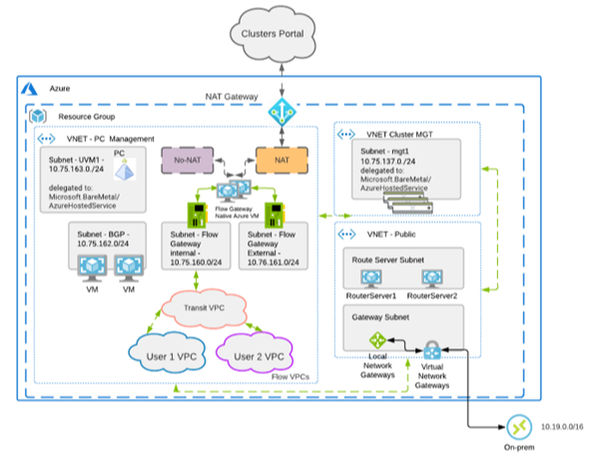
  • Co-Developed: A specific benefit of utilizing NC2 on Azure is its co-development, which enables the use of Nutanix Flow Networking to streamline management processes. This feature also accommodates multiple Flow gateways as illustrated in the diagram below, thereby bolstering security measures and control.
Picture

Comparing Azure VMware Solution (AVS) and Nutanix Cloud Clusters (NC2) on Microsoft Azure

​Azure VMware Solution (AVS) and Nutanix Cloud Clusters (NC2) on Microsoft Azure are both powerful tools designed to facilitate the movement and management of workloads across hybrid cloud environments. However, they do offer different features and focus areas. Here is a comparison of the two based on several key criteria:
Technology Stack:
  • Azure VMware Solution: AVS is primarily designed for businesses that use VMware technology stacks. It allows you to move your on-premises VMware-based workloads to Azure without the need for any modification, thus ensuring a consistent and familiar environment.
  • Nutanix Cloud Clusters on Microsoft Azure: NC2 is designed for organizations already using Nutanix environments. It provides a consistent environment between on-premises Nutanix clusters and Azure, simplifying the movement and management of workloads.
Integration and Management:
  • Azure VMware Solution: With AVS, you can integrate Azure services with your VMware environment using Azure Resource Manager and Azure portal. However, you would still need to use familiar VMware tools to manage VMware workloads.
  • Nutanix Cloud Clusters on Microsoft Azure: NC2 integrates deeply with Azure, providing a unified management experience across private and public clouds through Nutanix's Prism interface. This gives a single-pane view of all your resources, reducing management overhead.
Cost:
  • Azure VMware Solution: AVS uses a different cost structure that is based on nodes. You must purchase at least three nodes to start with AVS, which might not be cost-effective for smaller deployments.
  • Nutanix Cloud Clusters on Microsoft Azure: NC2 offers more flexibility in terms of cost as it supports a pay-as-you-go pricing model. You can halt clusters during off-peak hours to conserve resources and costs, making it more flexible for various deployment sizes.
Mobility and Flexibility:
  • Azure VMware Solution: AVS offers seamless mobility for VMware-based applications. However, the ability to move workloads back and forth between on-premises and Azure depends on your specific VMware configurations.
  • Nutanix Cloud Clusters on Microsoft Azure: NC2 provides seamless application mobility between on-premises Nutanix clusters and Azure. It enables instant scaling of resources based on need and offers the flexibility to move applications back and forth as required.
Disaster Recovery and Business Continuity:
  • Azure VMware Solution: AVS offers robust disaster recovery solutions using Azure Site Recovery and Azure Backup. However, your business continuity strategy might be tied to your VMware-specific implementations.
  • Nutanix Cloud Clusters on Microsoft Azure: NC2 provides high availability and disaster recovery capabilities, with the option to move or recover applications on Azure in the event of local disasters. It aligns with Azure's standard security model, providing comprehensive protection.
​Both Azure VMware Solution and Nutanix Cloud Clusters on Microsoft Azure are powerful solutions for businesses seeking to maximize their hybrid cloud capabilities. The choice between the two primarily depends on your existing technology stack and specific business needs. AVS might be more suitable if your organization heavily relies on VMware technologies. However, if you're seeking a solution that offers a more integrated experience with Azure, along with the flexibility of managing Nutanix workloads, then NC2 could be your ideal choice.

Getting started with Nutanix Cloud Clusters on Microsoft Azure (NC2) can be simplified into a few key steps:

​Setup Nutanix and Microsoft Azure Accounts:
You'll first need to have active accounts on both platforms. For Nutanix, this involves setting up a Nutanix account and creating a Nutanix cluster. On Azure, you'll need to set up an Azure subscription.

Connect Your Nutanix and Azure Accounts:
The next step is to connect your Nutanix account with your Microsoft Azure account. This is done via the Nutanix Cluster's Prism interface, where you'll provide Azure subscription details to enable the integration.

Configure Networking:
Nutanix leverages Azure's virtual network to provide seamless connectivity. You'll need to ensure that your Nutanix and Azure environments are correctly networked. Typically, this involves setting up a VPN or ExpressRoute connection between your on-premises network and Azure's virtual network.

Deploy Nutanix Clusters on Azure:
Once your accounts are connected, and networking is set up, you can deploy Nutanix clusters on Azure. You can do this through the Prism interface, where you can specify the size of your cluster, the Azure region you want to deploy to, and other settings.

Move Workloads:
Once your clusters are deployed, you can move workloads between your on-premises Nutanix clusters and Azure. The process for this will depend on the specific nature of your workloads, but generally, it involves creating VMs on your Azure Nutanix clusters and migrating data to these VMs.
​
Manage Your Environment:
After your workloads run on Azure, you can manage your environment through the Prism interface. This includes monitoring your workloads, scaling your clusters up or down based on need, and managing security and compliance.

Remember to leverage Nutanix's extensive documentation and customer support if you encounter any issues during setup. 

As with any cloud offering, it's important to thoroughly understand the cost implications of deploying Nutanix Clusters on Azure. Be sure to calculate the potential costs based on your specific requirements carefully and to monitor and adjust your usage to optimize your expenditure regularly.
​Adopting and implementing Nutanix Cloud Clusters on Microsoft Azure (NC2) could be a strategic move for businesses looking for agility and efficiency in managing multi-cloud environments. The path to setting up and running NC2 is straightforward, but remember, the real strength lies in regular monitoring and optimization. Keeping a close eye on cost implications is imperative to ensure your cloud expenditure stays in check.

​Always remember, that Nutanix's extensive documentation and support services are available to assist you at each step, offering professional guidance to help you navigate this digital transformation journey successfully. Explore the potential of NC2 on Microsoft Azure today and redefine your cloud strategy for a future-ready business!

Resources

nutanix-cloud-clusters
press-releases

0 Comments

Your comment will be posted after it is approved.


Leave a Reply.

      Join Our Community

    Subscribe

    Categories

    All
    Artificial Intelligence
    Automation & Operations
    Certification & Careers
    Cloud & Hybrid IT
    Enterprise Technology & Strategy
    General
    Hardware & End-User Computing
    Virtualization & Core Infrastructure

    Recognition

    Picture
    Picture
    Picture
    Picture
    Picture
    Picture
    Picture
    Picture
    Picture
    Picture

    RSS Feed

    Follow @bdseymour

Virtualization Velocity

© 2025 Brandon Seymour. All rights reserved.

Privacy Policy | Contact

Follow:

LinkedIn X Facebook Email
  • Home
  • About
  • VMware Explore
    • VMware Explore 2025
    • VMware Explore 2024
    • VMware Explore 2023
    • VMware Explore 2022
  • VMworld
    • VMworld 2021
    • VMworld 2020
    • VMworld 2019
    • VMworld 2018
    • VMworld 2017
    • VMworld 2016
    • VMWorld 2015
    • VMWorld 2014
  • vExpert
  • The Class Room
  • VMUG Advantage
  • AI Model Compute Planner
  • AI-Q Game
  • Video Hub
  • Tech-Humor
  • Contact